Content reviewed 24 November 2026
When to use it
Use Find Trains when you know where you want to travel but do not know the train number.
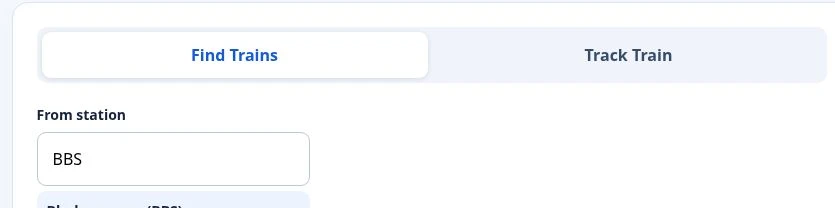
- Choose your boarding stationEnter your boarding station in From station and select the matching suggestion.
Select the matching From station. - Choose your destinationEnter your destination in To station and select its suggestion. You can also enter station codes.
Select the matching To station. - Find your servicesSelect Search trains to see the returned services. Use the swap button to reverse the stations.
Choose a train from the results. - Open the journey timelineSelect a train card to open its journey timeline in Track Train.
Read the highlighted stops and timings.
Real tool captures · 24 November 2026 · Example results, not a live enquiry.
What the cards show
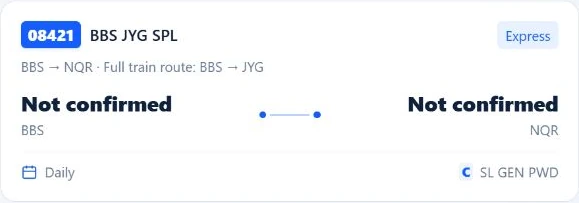
Train cards show the train number, name, service type and available timing, running-day and class information. Match the station codes to your journey before using the displayed times: cards whose route codes do not match your selected pair hide their times. Open tracking to inspect your selected stops.
Station code example
For example, BBS identifies Bhubaneswar and NQR identifies Naraj Marthapur in the current search. This is a search example, not a promise that a particular service is available on your travel date.
See the search and train-card examples
Search your service
If you already know the service, open Track Train and enter its number or name. Select Track Train to load a number directly, or choose the correct service from the name-search results.
Read the timeline
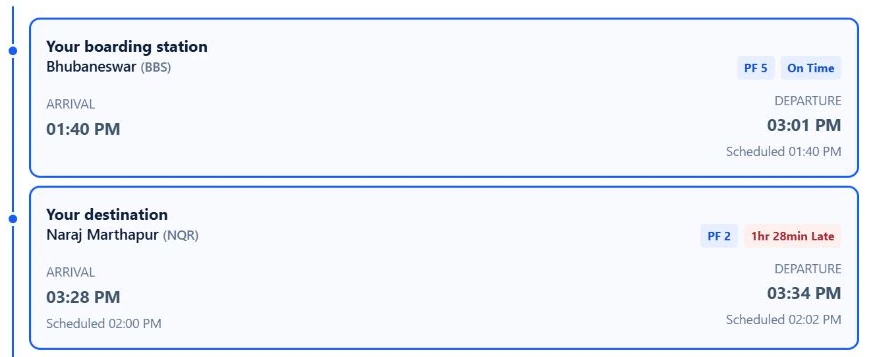
Confirm the train’s route and direction, then read the station timeline. Arrival and departure times appear beside each stop, with platform and delay labels where the source supplies them.
Check the journey date
The current tool does not provide a verified journey-date selector or confirmed current location. A station report can still be useful while the summary says Location unverified. Check official railway enquiries when you need to identify a specific dated run.
| Displayed information | How to read it |
|---|---|
| Source and destination | The endpoints of the displayed train route. Your boarding station may be an intermediate stop. |
| Arrival and departure | Times supplied for each station. The main displayed value is reported by the source; it is not always identified as an actual event or an estimate. |
| Scheduled time | The smaller supporting time, where supplied, labelled separately from the main reported time. |
| Delay label | The source’s reported delay for that station. A delay can differ at later stops. |
| PF | Platform information supplied by the source. Confirm it on station displays and announcements. |
| Source update | The time label received from the source. A clock-only label does not establish the report’s date or timezone. |
| Location unverified | The tool has not confirmed the train’s current position. It does not mean all station fields are missing. |
Illustrative example: If a scheduled arrival is 10:00 and the reported arrival is 10:25, the difference is 25 minutes at that stop. Do not carry that calculation forward as the delay at every station.
Timetable or Live Update?
A timetable describes the planned route and timings. A running update describes reported progress for a journey. Seeing a route or scheduled time alone does not prove that the train has departed or arrived.
An estimated time of arrival, often called an ETA, is a forecast rather than a guarantee. This tool does not independently verify that every main time in its source is an actual arrival or an ETA, so read it as a reported value.
Missing or Conflicting Information
Check the train number, direction and station first. If the result is empty, retry later or consult official railway enquiries. An unavailable response does not establish that a train is cancelled.
When two services disagree, compare the station, dated run and available report timestamps. One may show an estimate while another has a recorded event or a different update time. At the station, use the display boards, announcements or enquiry counter for immediate boarding information.
Boarding date vs. departure date
Your boarding date may differ from the date the train left its origin. A train that starts on Monday evening may reach your boarding station after midnight on Tuesday.
Choose the origin date
When an enquiry service asks for the train’s origin departure date, choose Monday in that example. Our current tool does not let you select or verify that dated run; use a service with an explicit journey-date control for overnight or yesterday’s trains.
A separate Android app
The Where Is My Train Android app is separate from this website. Google’s app guidance describes finding services by number, name or station pair and viewing journey information. Use the official app instructions for its controls.
Read how Where Is My Train works without internet for the difference between offline schedules and onboard location.
Offline Use and Downloads
Offline features
The developer’s Android listing says the app can use cell-tower information for onboard location while travelling without internet or GPS. It also describes offline schedules. Those app features do not make this website an offline tracker: a fresh website enquiry needs an internet connection.
Download safely
Use the official Google Play listing to check the publisher and download options. Check official platform availability before installing an app on iPhone or PC; an Android APK is not an iPhone or desktop installer.
Booking vs. running status
Train running information and reservation information answer different questions. Running information concerns the train’s journey; PNR status concerns your booking. Use the train number in your ticket to search here. These tools do not check PNR status or book tickets.
Coach position vs. platform
Coach position describes the order of coaches in a train. A platform is the station track used for boarding. The platform labels in a report do not confirm your reservation or tell you where your coach will stop.
Official railway source
Use the National Train Enquiry System (NTES) for official railway enquiries. Follow current station displays and announcements for platform changes or other immediate travel updates.
Independent website
This is an independent website, not the Where Is My Train app. It is not affiliated with Google, Indian Railways, IRCTC or CRIS.
How do I find a train without its number?
Use Find Trains with your From and To stations. Select a returned train card to open its tracking view. You can also search for a train name in Track Train and confirm its direction before choosing it.
Can I search using station codes?
Yes. Enter the codes in the From and To fields, or select station names from the suggestions. Check the codes before searching, especially when a city has several stations.
Why does a train card show different route endpoints?
The source may display the train’s full origin and destination even when you searched for two intermediate stations. Open the timeline and check your actual boarding and arrival stops before using a time.
Can I check yesterday’s train?
The current tool does not have a verified origin-date selector. For a train that started yesterday, use a railway enquiry service that explicitly identifies the run by its origin departure date.
Does “Location unverified” mean the train is cancelled?
No. It means the tool has not confirmed a current position. Read any available station report and use official enquiries to confirm cancellations or other operating changes.
How often does the report update?
Updates depend on the source. Reloading the page does not prove that new railway information has arrived. Check the source update label, and remember that a clock-only value does not confirm a dated report.
Are platform numbers guaranteed?
No. Confirm your train and platform using current station displays, announcements or railway staff before boarding.
Does this website work without internet?
A fresh search or station report needs an internet connection. The separate Android app has documented offline features, described in the app section above.